Build a task-load schedule that records people, protective equipment where applicable, tools, materials, containers, attachments, simultaneous quantities, positions and task states. Compare that schedule only with exact approved limits for the exact configuration and work method. The schedule does not calculate capacity, select equipment, authorise material handling, define training, or establish that a platform may hoist, carry, travel with or transfer a load.
Contents
- Frame the load decision around a task state
- Build a traceable people-tools-materials schedule
- Map the load path and unresolved interfaces
- Escalate every task against exact approved limits
- Answer common task-load questions
Frame the load decision around a task state
Separate task state from crew count
“Two workers” is not a load description. Record what those workers wear or carry, which tools operate at the same time, which materials and containers are present, where they are positioned and whether anything changes during entry, travel, setup, work or withdrawal.
Break the job into stable task states. Inspection with handheld instruments, panel replacement with packaged components and service work with powered tools can place different demands on the work area even with the same crew. The ceiling-platform project-data guide provides the wider project-input structure; this article focuses only on the task-load schedule.
Record source and date traceability
Give every input a source, date, owner and revision. People counts should come from the approved method; tool and material information should come from controlled task records; configuration limits should come from current approved equipment documents. Mark estimates as estimates and replace them before release.
Do not copy a number from an archival product range, photograph, sales message or unrelated configuration. The ARC-F20 page may provide archival category context, but this article makes no capacity, crew, attachment or handling statement about it.
Keep the exact configuration dependency visible
Limits can depend on the exact configuration, platform arrangement, permitted attachment, task state and instructions. Record the document identifier and applicable configuration beside every comparison. If the schedule and approved document do not use the same definition, stop and ask the responsible technical owner to reconcile them.
Avoid generic formulas. A total arithmetic sum does not by itself establish load distribution, attachment effects, dynamic effects, permitted position or travel state. The artifact is a structured input for review, not an engineering calculation.
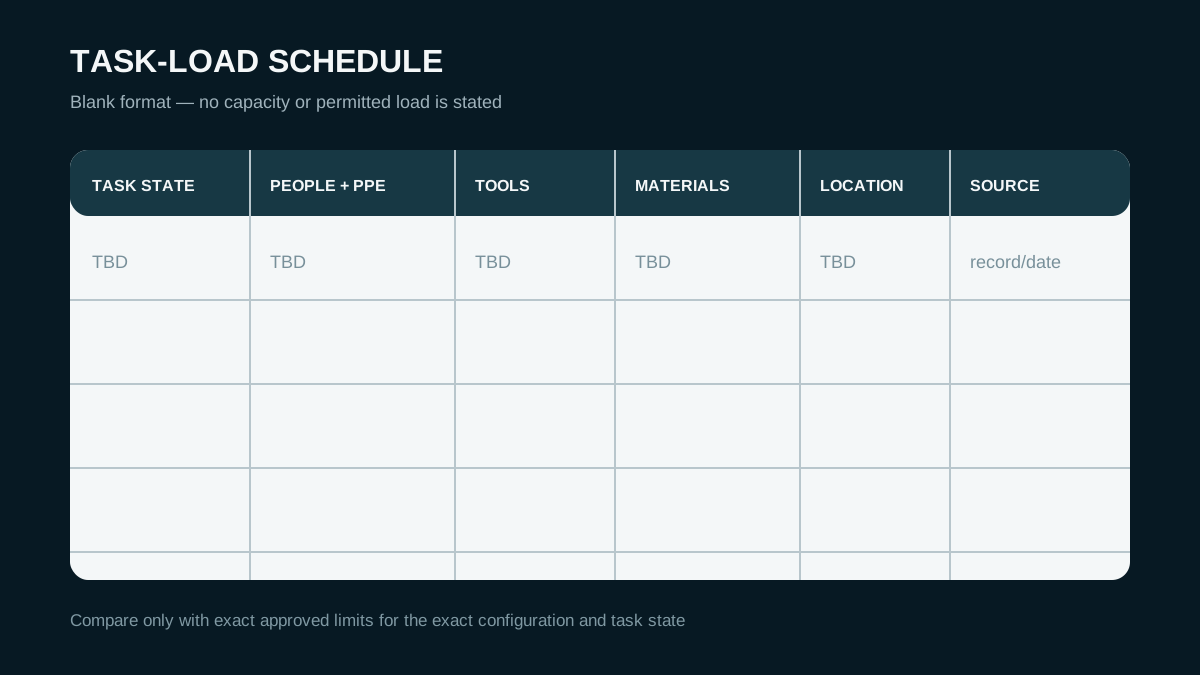
AI-assisted editorial diagram; not evidence of ARCLIFT equipment, configuration, project, capability or result. Tap to open the full-size editorial diagram. This example format contains no approved values; exact documents and competent project review control actual limits.
Build a traceable people-tools-materials schedule
List people and protective equipment fields
Record each role present in the task state, including workers, an instructor or specialist if that person is physically present, and any other occupant permitted by the approved method. List task-related protective equipment when its mass or placement matters to the review.
Do not publish personal names, medical information or individual identifiers. Use role labels in the schedule and keep training and authorisation records in the employer’s controlled system. Crew count remains a project input until the exact instructions and site method confirm it.
List tools, materials and containers
Identify each tool, battery, cable, hose, test device, consumable, replacement component, fastener, waste item and container. Record quantity, individual source value where controlled, combined task quantity, dimensions and any storage or securing method proposed by the task owner.
Do not assume that a tool bag, rack, overhanging item or long component is permitted. Do not use lifting-system tonnage as a platform limit. If an item requires a fixture or attachment, list that interface separately and hold the task until the approved documentation addresses it.
Record simultaneous quantity and location
The schedule should show what is present at one time, not the total material consumed during a shift. Mark where people and items are intended to be placed and how the arrangement changes during the task. Include removed components and waste if they remain in the work area.
This positional record does not calculate distribution. It lets the competent reviewer identify concentrated, offset, unsecured or changing conditions that need exact technical information. Treat any uncertain position as an open item.
Map the load path and unresolved interfaces
Define entry and exit points
Trace every item from receipt to controlled staging, transfer to the task area, use and removal. Identify who checks it, where quantity is controlled and what happens to removed material. Keep emergency and access routes clear according to the approved site method.
The trade-off is that a detailed path takes more planning, but it prevents the task-load schedule from describing only the final work face. A load can create a route, floor, manual-handling, dropped-object or transfer issue before it reaches the elevated task.
Describe transfer and staging without assuming permission
State the proposed transfer owner, location and method as a project input. Do not describe a platform as a crane, hoist, material handler or travel-with-load device unless exact approved documents and the project method expressly establish that use. This page establishes none of those permissions.
U.S. OSHA’s Aerial Lifts eTool uses workers, tools and materials as load considerations in U.S. occupational-safety context and cautions against using an aerial lift as a crane. It is an adjacent planning source, not an ARC-F classification, a capacity table or a statement of project applicability.
Isolate unresolved attachments and moving conditions
Record proposed racks, holders, fixtures, power leads, tool tethers, material supports and other interfaces as unresolved until exact documentation confirms their status. Include how their position changes and whether they remain attached during transport, setup, task or withdrawal.
Moving or long items can create effects beyond a static list. Do not estimate those effects in marketing copy. Route them to the manufacturer documentation and competent project review that apply to the exact equipment and method.
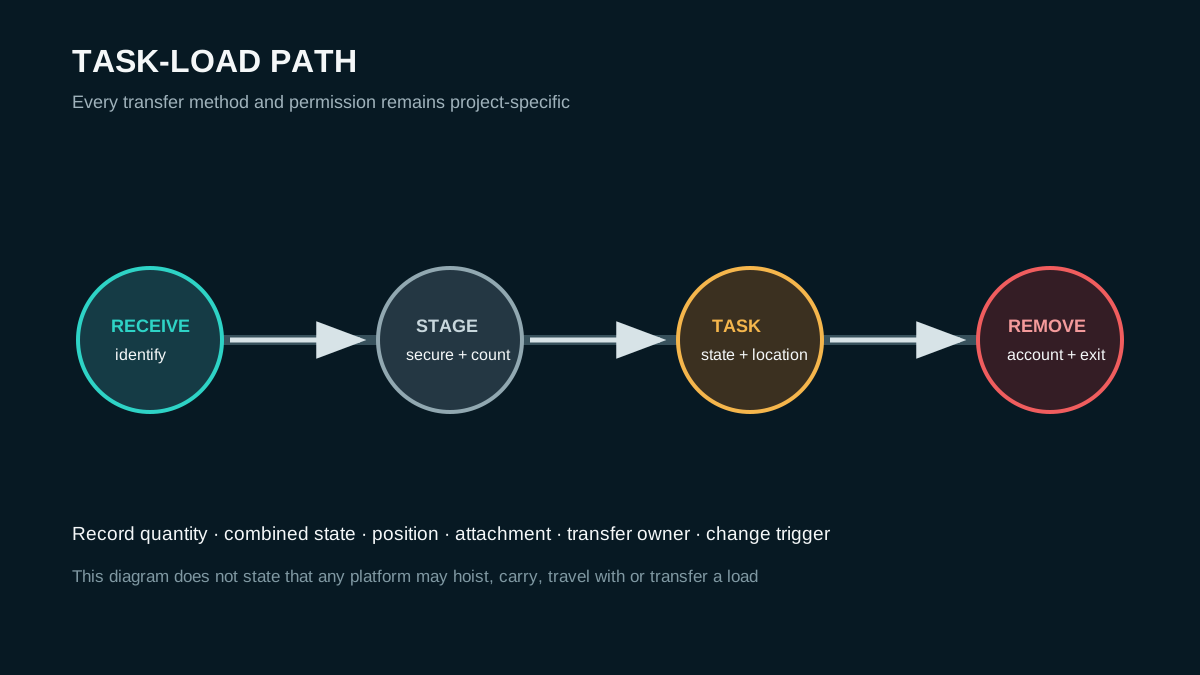
AI-assisted editorial diagram; not evidence of ARCLIFT equipment, configuration, project, capability or result. Tap to open the full-size editorial diagram. This workflow does not state that ARCLIFT equipment may hoist, carry, travel with or transfer any depicted load.
Escalate every task against approved limits
Use the exact manufacturer document
U.S. OSHA 29 CFR 1926.453 states, within its covered U.S. construction scope for listed vehicle-mounted aerial devices, that manufacturer-specified boom and basket load limits must not be exceeded. That bounded rule does not classify an ARC-F reference, establish that the rule applies to it, or provide a permitted capacity.
For the project, obtain the current manufacturer instructions and approved configuration records. Verify document revision, equipment identity and task state. A source about a general class cannot replace those exact records.
Require competent project review
The competent reviewer should compare the full schedule, positions, attachments, task sequence and transfer method with the approved documents and site method. Separate equipment-limit review from floor support, manual handling, dropped-object control and work-at-height planning.
The indoor floor and ground-pressure guide addresses the support-path interface. Do not assume that a task-load comparison settles floor reactions or route suitability.
Set clear stop-work triggers
The current task may not fit when an item is missing from the schedule, a value lacks a traceable source, the configuration reference differs, an attachment is unresolved, the task position changes, the transfer method is unapproved, or the exact limit cannot be confirmed. Stop and reissue the schedule.
Do not continue on the basis of remaining arithmetic margin. The applicable documents may include conditions that a simple total cannot represent. No editorial diagram, preliminary comparison or supplier discussion authorises use.
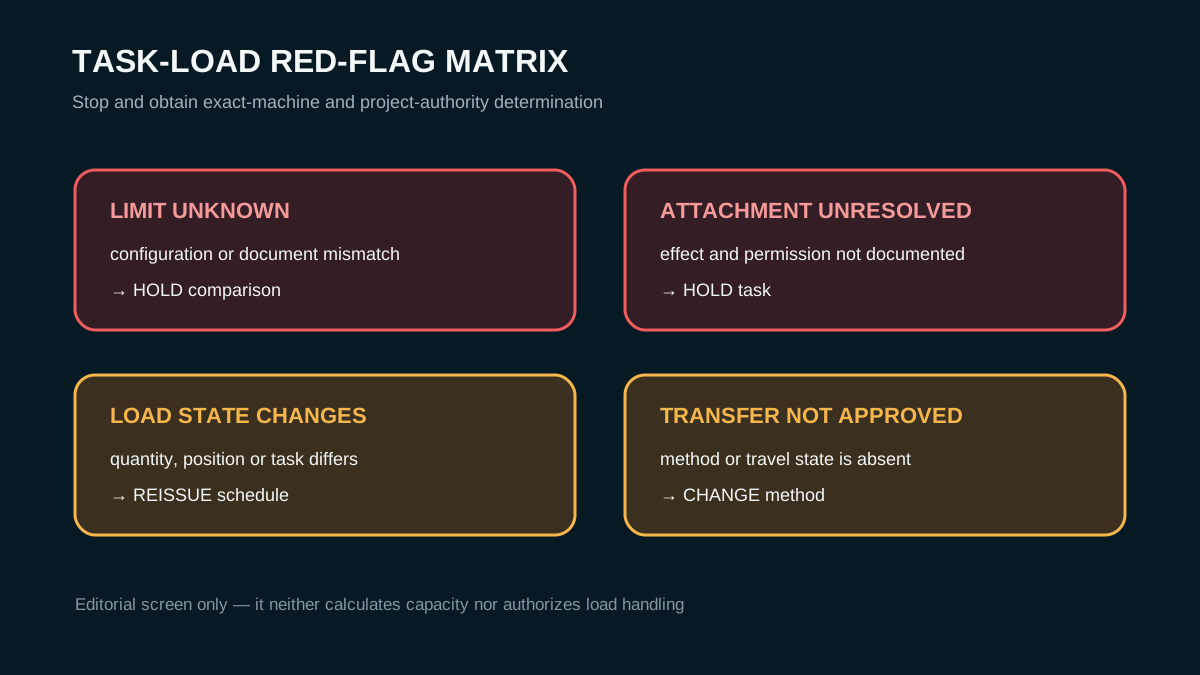
AI-assisted editorial diagram; not evidence of ARCLIFT equipment, configuration, project, capability or result. Tap to open the full-size editorial diagram. This editorial screen neither calculates capacity nor authorises load handling; actual use requires exact-machine and project-authority determination.
Issue the task-load schedule
- Site and destination jurisdiction, work-zone height, ceiling geometry, task owner and revision
- Access and transport route, floor or ground status, staging point and withdrawal path
- Exact task state, work sequence, simultaneous activity and change trigger
- People by role, protective equipment where applicable, training-record owner and source date
- Tools, batteries, cables, hoses, test devices, consumables and controlled quantities
- Materials, components, containers, removed items, dimensions, locations and securing proposal
- Attachment, rack, holder, fixture or tether status and exact approved document reference
- Entry, transfer, staging, task and removal method with each responsible role
- Exact configuration identifier, manufacturer instruction, applicable limit and document revision
- Unresolved dynamic, concentrated, offset, travel or transfer condition routed to competent review
- Site communications, rescue access, emergency interface and stop-work trigger
Send only the schedule for controlled comparison
Send only the task-load schedule through a secure project channel to ARCLIFT as an integrated equipment supplier. Include the site and zone, height and task state, access and transport route, floor status, people, tools, materials, attachment questions, destination context and exact source records. This request does not promise suitability, fit, approval, quotation, configuration, availability, result or response time. Final use requires project-specific signed documents from the responsible employer, manufacturer information and competent reviewers.
This article is editorial planning guidance, not a capacity calculation, load chart, material-handling permission, training document or operating instruction. Its AI-assisted editorial diagrams cannot establish a platform limit, handling function, configuration, capability or result.
FAQ
Why is crew count insufficient?
Because tools, materials, containers, attachments, positions and task states can change while the crew count stays the same. A reviewer needs the complete simultaneous task load and its sources.
What belongs in a task-load schedule?
List people by role, relevant protective equipment, tools, materials, containers, removed items, attachments, quantities, positions, task states, transfer method and source records.
Who confirms limits?
The exact manufacturer instructions supply configuration-specific information, while the employer and competent project reviewers decide how it applies to the task and site method.
Can the platform be treated as a crane?
Not from this article, a category label or a diagram. Any lifting or transfer proposal requires express exact-equipment documentation and project approval; otherwise the task remains on hold.